
Dice and rolls
RollCall Tavern rolls the dice for you. Rolls that count at the table are made on the server, not in anyone’s browser, so nobody can fake a natural 20, and they land in a log the whole table can read. This page covers where rolls come from, the dice you see on the board, and the roll log.
Rolls in a fight
Most rolls happen in combat, from the action bar along the bottom of the board. The right dice and the right bonuses are already filled in:
- Attacks. Pick an attack or a spell in the action bar, then click the target. The attack roll goes first and, on a hit, the damage. The damage comes off the target’s hit points and both rolls go in the log.
- Spells with a save. Aim the spell (a Fireball shows its circle on the board) and cast. Monsters in the area roll their saves at once, each player gets a prompt to roll theirs, and the damage or effect follows from each result.
- Call for a save. For traps, dragon fear and anything that is not a spell: pick the ability, the difficulty and who saves. Monsters roll at once. Each player gets a prompt on their own screen to roll theirs.
- Concentration. When a creature that is concentrating takes damage, the concentration save is asked for on its own.
Dice on the board
On the living board, attack rolls and rolled saves are thrown as dice onto the board, between the attacker and the target, so everyone at the table watches the same die land. The number is already decided when the die is thrown; the animation only shows it. A die never gives away a creature the players cannot see, and checks you roll for yourself never appear.

The living board is on by default on a laptop or desktop, and you can turn it off under Settings, Combat (see Running a session). Without it, the same rolls happen and fill the same log.
The roll log
During a fight, the Rolls strip in the bottom-right corner of your board shows the last three rolls, with HIT or MISS on attacks. Click it to see the last ten. It includes the rolls your players make on their own phones. The Log in the bottom-left corner (key L) opens the full combat log: every attack, save, damage and condition, in order.
Players have the same history on their phones, under Table, Rolls. It lists everyone’s rolls with the dice and the bonus (1d20+6 = 10 + 6), who rolled, and filters for All, Mine, Attacks, Saves and Damage.
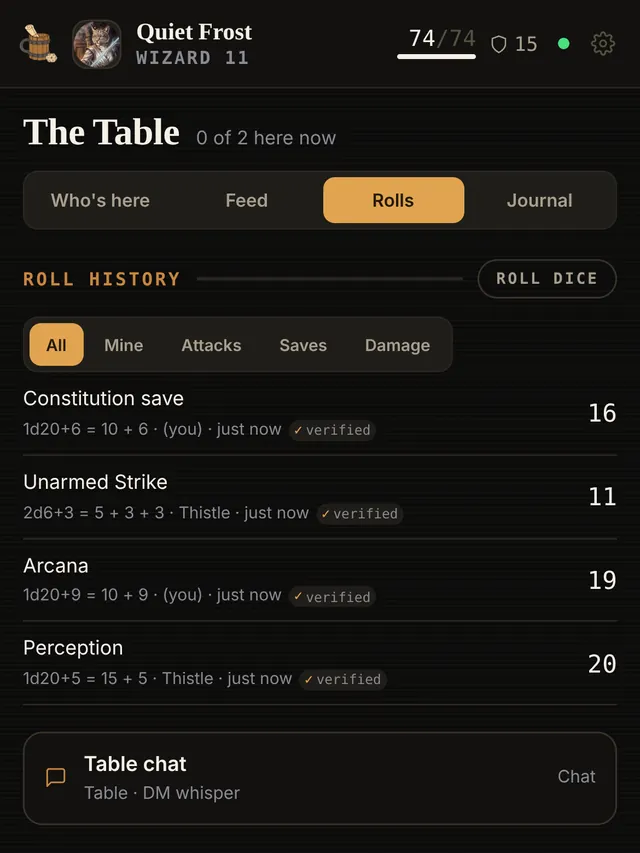
The small verified mark beside a roll means the player’s own browser checked it: before the roll, the server sent a sealed value, and afterwards the browser confirmed that the result could only have been that number.
Rolling outside a fight
- Players press Roll dice (on the Rolls tab, or the dice button on their phone) to roll anything: pick the dice, add a bonus, choose normal, advantage or disadvantage, and give it a name like Perception. The result appears for them at once and goes into everyone’s history.
- You can tap an ability, a save or a skill on a character’s sheet in Characters to roll it. That result shows only on your screen, which suits a secret Perception check.